
Troubleshooting
symptom, cause, fix.
Start every investigation with node src/cli.mjs doctor: it checks each data source, the pump.fun WebSocket, your keys and your config, and says what each failure breaks. Then look where the desk writes its own errors. The common problems, and how to check each integration, are below.
01Where to look first
The commands on this page are written for the shell of macOS and Linux (bash or zsh). On Windows, run them in WSL (Windows Subsystem for Linux, Ubuntu) or Git Bash: commands such as cp, openssl, rm -rf and multi-line curl with \ do not work as written in PowerShell or cmd. The node and npm commands work in any of them.
| Place | What you find there |
|---|---|
The terminal (or pm2 logs outrider, docker compose logs -f outrider, journalctl -u outrider) | Start-up messages, [admin] … console messages, one line per desk cycle, every alert, telegram notify failed: …. |
node src/cli.mjs doctor | One line per data source: ✅ works, ❌ failed (with what it breaks), · optional and not set up; then config warnings. |
data/journal.jsonl | Every decision and every error the running desk caught, one JSON row each. Errors have "type":"error" and the agent that failed. |
| Console → Monitor → Status | The health checks: Solana RPC, Hyperliquid API, pump.fun stream, journal hash chain, liquidation map, Telegram token. |
| Dashboard → Desk control, Ledger | What blocks entries, the reason for each skipped candidate, and the Live tab with every live fill, dry run and skip. |
grep '"type":"error"' data/journal.jsonl | tail -20                 # the last 20 caught errors
grep '"type":"error"' data/journal.jsonl | grep '"agent":"pump"' | tail # one agent: pump, news, analyst, live, whale …
An excerpt that shows the format, with the public RPC, no keys and the optional modules off (times, values and counts are your own):
✅ Hyperliquid info                 … ms  SOL $…
·  HL leaderboard                   … ms  The operation was aborted due to timeout  → `outrider leaders` needs it
✅ Solana RPC                       … ms  slot …
·  Polymarket Gamma                 … ms  fetch failed  → POLYMARKET cannot find markets or settle; POLYMM has no metadata
·  TypeSafe Jev                     … ms  TYPESAFE_API_KEY not set  → Jev is optional — the desk runs without it
✅ pump.fun stream (WS)             … ms  20+ pump.fun log messages — stream healthy
⚠ pump.wsUrl is the public endpoint — it drops heavy streams; get a free Helius/QuickNode WS

All checks passed. (… optional check(s) unavailable.)
Lines with · are optional: services of a module that is off, or keys you have not set. Polymarket is not available from every location, and the large Hyperliquid leaderboard file can time out. Neither stops the memecoin desk. With the module that needs a source switched on, the same failure shows ❌ and counts as failed.
02Solana RPC and WebSocket
Symptoms: no pump.fun events, "pump.fun: not connected" in Telegram /status, the console check "Solana RPC answers" failing, live mode refusing to start.
- Test the HTTP endpoint
A healthy endpoint answerscurl -s -X POST -H 'content-type: application/json' \ -d '{"jsonrpc":"2.0","id":1,"method":"getHealth"}' '<your https RPC URL>'{"jsonrpc":"2.0","result":"ok","id":1}. An"error"object usually means a wrong or expired key, or a plan limit: check your provider's dashboard. - Test the WebSocket
node src/cli.mjs doctorsubscribes to pump.fun logs for up to 12 seconds.20+ pump.fun log messages — stream healthyis good.connected, but no pump.fun logs arrivedmeans the socket opened but nothing came (provider plan, or a wrong URL).WebSocket errormeans it could not connect.no global WebSocket — use Node 22+means your Node is too old. - Read the journal
grep '"agent":"pump"' data/journal.jsonl | grep '"type":"error"' | tailws connect: …= the connection failed;ws stalled — forced reconnect= the socket went quiet and was reopened (normal after a laptop sleeps, worrying if constant);ws: {…}= an error object your provider returned for the subscription. - Check which URL is usedThe console field Integrations → Solana RPC URL, when set, replaces
solanaRpcand derivespump.wsUrl(http→ws). If your provider's WebSocket address is different, leave the console field empty and set both inconfig.json(how). - Public endpoint
api.mainnet-beta.solana.comdrops heavylogsSubscribestreams; doctor warnspump.wsUrl is the public endpoint. Use a private endpoint (providers).
03Nothing moves after the laptop slept
A sleeping computer leaves half-open sockets. The pump.fun stream pings every 20 seconds and forces a reconnect when the socket stalls, even if no close event arrives; the journal logs "ws stalled — forced reconnect". Nothing is watched while the machine sleeps, so the paper record has gaps. For a continuous record, run on a server (Deployment).
04Hyperliquid: API wallet and live orders
Live mode does not start. The desk stops with live mode cannot start: followed by one line per problem. The Hyperliquid ones:
| Line | Fix |
|---|---|
HL_API_WALLET_KEY must be 0x + 64 hex characters (Hyperliquid → API → generate) | Paste the API wallet's private key, not its address, with the 0x prefix and no spaces. |
HL_ACCOUNT_ADDRESS must be your Hyperliquid account address (0x + 40 hex) | Your main account address, the one the API wallet trades for. |
live.hyperliquid.maxTradeUsd must be > 0 | Set a positive cap in Live trading. |
live.confirm must be exactly "I accept that OUTRIDER places real orders and I can lose money" | Type the sentence exactly, without quotes or a full stop. |
enable live.pump and/or live.hyperliquid | Switch on at least one venue. |
Orders are skipped or fail. Read the Live tab, or:
grep '"type":"live_' data/journal.jsonl | tail -20     # live_fill, live_dry, live_skip, live_rebase, live_kill
grep '"agent":"live"' data/journal.jsonl | tail -10 # failed live orders with the exchange's error text| Journal text | Meaning |
|---|---|
waiting for the first account snapshot (books not rebased on the real account yet) | The desk has not read your account yet (the first snapshot failed or is pending). Check HL_ACCOUNT_ADDRESS, and that the testnet switch matches where your account and API wallet are. |
below Hyperliquid's $10 minimum | The rebalance was too small; Hyperliquid rejects orders under $10. Not an error. |
gross live exposure $… at the $… cap | live.hyperliquid.maxNotionalUsd reached. Working as designed. |
not filled (IOC found no liquidity inside the slippage bound) | The price moved more than live.hyperliquid.slippagePct. Counted as a failure. |
… is not tradable on Hyperliquid | The coin is not listed or is delisted. |
dry run: order built, not sent | Dry run is on. Nothing was sent. |
live_kill with 3 live orders failed in a row | The kill switch was set after live.maxFailures failures. Fix the cause, then release the kill switch. |
Any other error text in an "agent":"live" row is Hyperliquid's own answer, passed through (for example when the API wallet is not authorised for the account, or the account has no margin). To see what the exchange thinks your account holds:
curl -s -X POST https://api.hyperliquid.xyz/info -H 'content-type: application/json' \
  -d '{"type":"clearinghouseState","user":"<your 0x account address>"}' | head -c 400
If the API wallet was revoked or expired on Hyperliquid, generate and authorise a new one and replace the key (how).
05PumpPortal and live pump.fun orders
Live pump.fun transactions are built by PumpPortal's local-trade API, signed on your machine and sent through your RPC.
| Text (Live tab or journal) | Meaning and fix |
|---|---|
PumpPortal <status>: … | PumpPortal refused to build the transaction. The status code and the first 200 characters of PumpPortal's answer follow, and the answer usually says why. A 5xx status means PumpPortal itself had a problem. A failed sell keeps the position and is tried again next cycle. |
simulation: {…} in a dry run | The transaction would fail on chain. AccountNotFound usually means an empty wallet: fund it with a small amount to see clean simulations. |
transaction fee payer … is not this wallet | The transaction was not built for your wallet; it is never signed. Report it via Support. |
transaction failed: {…} | The transaction landed and failed on chain (for example slippage exceeded). |
not confirmed in time — check the signature on a block explorer | No confirmation within 60 seconds. It may still land later: look up the signature from the Live tab. |
bought but no token balance read back (tx …) — check the wallet | The buy confirmed but your RPC did not return the balance. Check the wallet on a block explorer. |
use a private Solana RPC for live trading … at start | Live pump.fun refuses the public endpoint. Set a private RPC. |
SOLANA_PRIVATE_KEY: Solana private key must be 64 bytes (got …), … public half does not match, invalid base58 | The key is not a full Solana secret key. Export it again from your wallet (base58, or the JSON byte array). |
06Anthropic API: 401, 429 and billing
Errors from Claude never stop the desk: news falls back to keyword scores and the briefing is skipped. They are written to the journal with "agent":"news" or "agent":"analyst", and the error text starts with the HTTP status:
grep '"type":"error"' data/journal.jsonl | grep -E '"agent":"(news|analyst)"' | tail -5| Status | Meaning | Fix |
|---|---|---|
401 with authentication_error | The key is wrong, revoked or has a typo. | Create a new key and set it again (owner, Integrations). If ANTHROPIC_API_KEY is set in the environment, that one wins and the console field is locked: change it there. |
429 with rate_limit_error | Too many requests for your account's limits. | Wait; the SDK retries some errors itself. Lower news.llm.maxPerCycle or raise analyst.everyHours in config.json. |
| A 4xx mentioning your credit balance or billing | The account has no usable credit. | Add credit or a payment method in the Anthropic console. |
| An error naming the model | The configured model is not available to your key. | Set news.llm.model or analyst.model in config.json to a model your account can use. |
Test the key outside the desk:
curl -s https://api.anthropic.com/v1/models \
  -H "x-api-key: $ANTHROPIC_API_KEY" -H "anthropic-version: 2023-06-01" | head -c 300
No errors and still no briefing? Check that the SDK is installed (npm ls @anthropic-ai/sdk; it is an optional dependency) and that analyst.enabled is on. The first briefing comes after analyst.everyHours. Telegram /brief says "The AI analyst needs an Anthropic API key (console → Integrations)." when no key is set.
07Telegram: token and chat id
- No messages at all. Both
TELEGRAM_BOT_TOKEN(or the console field) andTELEGRAM_CHAT_IDmust be set; with either missing, alerts only go to the terminal.doctorlists both. - The terminal shows
telegram notify failed: HTTP 401 https://api.telegram.org/bot***/sendMessage: the token is wrong (the token itself is never printed).HTTP 400 …: usually a wrong chat id, or you never pressed Start in the bot's chat. - Test the token and the chat id directly:
curl -s "https://api.telegram.org/bot<token>/getMe" curl -s "https://api.telegram.org/bot<token>/sendMessage" -d chat_id=<chat id> -d text=test"ok":truein both means the desk can send. The console's Integrations page can also test the token (manager or owner), and Status shows "Telegram bot (optional): token is valid when set". - Alerts arrive, commands are ignored. Commands are answered only in
TELEGRAM_CHAT_ID. In a group, also setTELEGRAM_OWNER_IDto your own user id (how). After changing the token in the console, restart the desk: the command listener reads it at start. - Two desks, one token. Only one program can read a bot's updates at a time. Stop the other one, or give each desk its own bot.
08Install problems and the console database (better-sqlite3)
The console stores its data in data/admin.sqlite through better-sqlite3, a native module. If it did not install for your Node version, the desk prints Admin console failed to start: … with the module's error and runs without the console.
- Check Node
node --versionmust be v22 or higher. After you upgrade Node, reinstall the modules. - Check the module
It should printnode -e "const D=require('better-sqlite3'); console.log('better-sqlite3 ok', new D(':memory:').prepare('select sqlite_version() v').get().v)"better-sqlite3 okand a version number. - Reinstall
If npm has to compile the module, it needs Python and a C++ compiler: Xcode Command Line Tools on macOS (rm -rf node_modules npm ci npm run buildxcode-select --install),build-essentialon Debian/Ubuntu. - One desk per data folderTwo processes on the same
data/write over each other's state and compete for the database. Stop the second one.
09Console sign-in behind a reverse proxy
The session cookie is called mk_admin. It is always HttpOnly and SameSite=Strict, and it is marked Secure when the request arrives over HTTPS or carries X-Forwarded-Proto: https. A Secure cookie is only sent back over HTTPS.
| Symptom | Cause and fix |
|---|---|
| Signed in, then sent straight back to the sign-in page | The proxy sends X-Forwarded-Proto: https but you opened the site over http://, so the browser refuses the Secure cookie. Open the https:// address, and redirect http to https in the proxy. |
| Sign-in works over HTTPS but the cookie is not marked Secure | The proxy does not send X-Forwarded-Proto: https. Add it (nginx: proxy_set_header X-Forwarded-Proto https;, Caddy: header_up X-Forwarded-Proto https). |
{"error":"host not allowed"} (403) | The domain is not in DASH_ALLOWED_HOSTS, or the proxy does not pass the original Host header. |
create the owner at /admin first (403) | No owner yet: create it locally or through an SSH tunnel (how). |
sign in at /admin (401) from the dashboard API | No valid session. Sessions last 12 hours. |
cross-origin request refused on the kill switch | The browser's Origin does not match the Host the desk sees. Pass the original Host header through the proxy. |
| Status chip says Polling | The proxy buffers Server-Sent Events. Turn buffering off for the site (nginx: proxy_buffering off;, Caddy: flush_interval -1). |
Check the cookie flags from the server itself (replace the email and password; the session token in the output is a credential, do not share it):
curl -s -D - -o /dev/null -H 'x-mikodes-admin: 1' -H 'X-Forwarded-Proto: https' \
  -H 'content-type: application/json' -d '{"email":"<email>","password":"<password>"}' \
  http://127.0.0.1:8790/admin/api/auth/login | grep -i set-cookie
# expect: …; HttpOnly; Secure; SameSite=Strict
Without the header the cookie is HttpOnly; SameSite=Strict; with X-Forwarded-Proto: https it is HttpOnly; Secure; SameSite=Strict. Run the same check through your proxy's public address to confirm that the proxy sends the header.
10"cannot be decrypted": the console secret key
[admin] secret "integrations.…" cannot be decrypted: was the secretKey changed?The key used now is not the one the secret was saved with:ADMIN_SECRET_KEYchanged, was added or removed, ordata/.admin-secret-keywas replaced (for example by copyingdata/without it). That feature then behaves as if no key were set.[admin] two-factor secret of … cannot be decrypted …The same cause, for authenticator codes. Sign in with a recovery code.Admin console failed to start: createAdminKit: secretKey must be 32 bytes as 64 hex chars or base64. Generate one with: openssl rand -hex 32ADMIN_SECRET_KEYhas the wrong format.
Fix: restore the old key and restart; if it is gone, re-enter the secrets. Full steps: Recovery path.
11Rate limits: 429 and timeouts
- Public Solana RPC.
fomo,collectand WHALE read transactions one by one; on the public RPC they are slow and get throttled. A private RPC insolanaRpcfixes most of it. - GeckoTerminal. The free API answers HTTP 429 quickly at about 27 calls a minute (the code comment on
gecko.minIntervalMs); the default is one call every 6 seconds. On a 429 the sweep backs off hard and stays slower; the progress line shows "(N× rate-limited)". Leave it running. - Hyperliquid. The liquidation map paces its reads; if many accounts fail, the summary shows "N failed". Reduce
--walletsor the console's accounts-per-refresh. - HL leaderboard timeout in
doctor: the leaderboard file is large; it only affectsleaders(perps module) and the liquidation map. Try again later.
12doctor shows a failed source
| Line | Effect | What to do |
|---|---|---|
| Polymarket Gamma / CLOB / data-api: fetch failed | The Polymarket books cannot find or settle markets. With the polymarket module off (the default) this is an optional · line. | Polymarket may not answer from your location or host. Leave the polymarket module off if you do not need it. |
| RSS feed: not JSON / 0 items / HTTP error | That feed adds nothing. | Remove or replace it in news.feeds. |
| Telegram channel failing | SHILL cannot read it. | Use the bare public channel name; private channels cannot be read. Channels are read only with telegram.readChannels: true (details). |
telegram.channels is set but telegram.readChannels is false — the channels are not read (opt-in) | A warning: SHILL reads nothing. | Set "telegram": { "readChannels": true } if you are allowed to read those channels, or empty the list. |
| TypeSafe Jev (·) | Optional. | Only for the jev module: set TYPESAFE_API_KEY if you have access (how). |
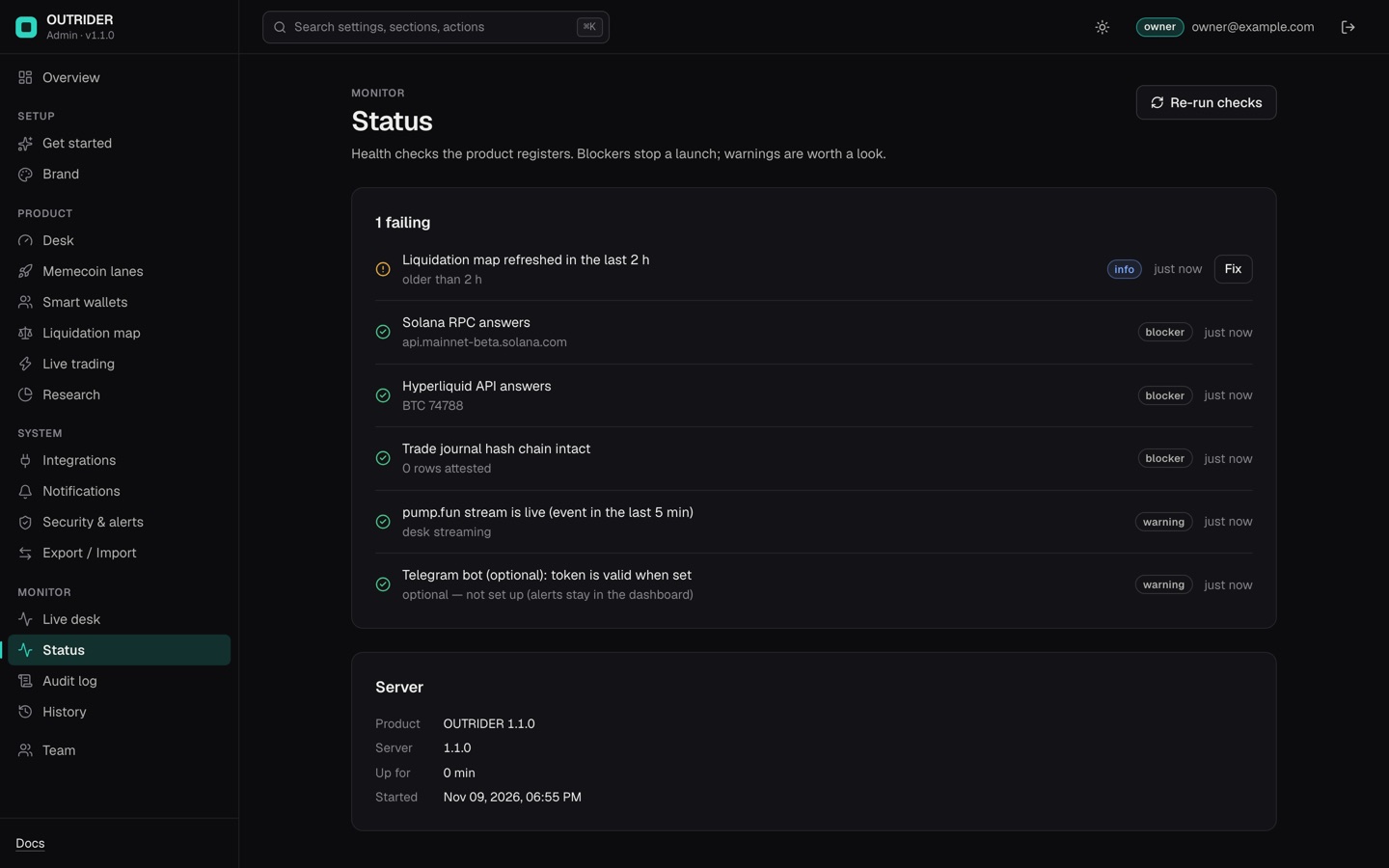
13The desk does not start
| Message | Fix |
|---|---|
config: …config.json: invalid JSON | A comma or quote is wrong. Check the file in a JSON validator. |
config: …: bankrollSol: expected number, got string | Write numbers without quotes; lists as […]; objects as {…}. |
mode "…" is not supported — use "paper", "alert" or "live" | Use one of those three. |
live mode cannot start: and a list | Fix every listed line (Hyperliquid, pump.fun), or set Mode back to paper in the console. |
Admin console off: build it once with `npm run build` (after `npm install`), then start again. | The compiled console in dist/ is missing. Run npm ci and npm run build, then start again. After every update, build again. |
tsc: command not found (or sh: tsc: not found) during npm run build | npm skipped the dev tools, usually because of --omit=dev or NODE_ENV=production in the shell. Run npm ci --include=dev, then npm run build. |
Admin console failed to start: … | Often better-sqlite3 (above) or the secret key format (above). |
Dashboard off: listen EADDRINUSE (npm start), or Error: listen EADDRINUSE: address already in use 127.0.0.1:8790 (npm run dash) | The port is taken, often by another desk you forgot. Stop it, or set DASH_PORT. |
.env not loaded: … | The .env file has a syntax error. One NAME=value per line. |
14Dashboard and console
- Sent to /admin all the time: once the owner exists, you must sign in. Sessions last 12 hours.
- 403 "the kill switch needs a manager or owner": viewers can watch but not stop or resume the desk.
- "The setup token is wrong. Use the value of ADMIN_SETUP_TOKEN from the server environment.": paste the exact value from
.env(no quotes or spaces). After changing.env, restart the desk. - "The setup code is wrong. It is printed in the server log.":
ADMIN_SETUP_TOKENis not set, so use a code printed by this install; restart to print a new one. - The desk refuses to start: "ADMIN_SETUP_TOKEN must be at least 24 characters": use a longer value (
openssl rand -hex 24) or leave it empty. - Too many failed sign-ins: wait 15 minutes.
- Lost two-factor device: sign in with one of your recovery codes instead of the authenticator code. With none left, another owner can remove your account in Team and add it again (you get a new one-time password).
- "restart pending" on the dashboard: you changed Live trading or a Mode involving LIVE while the desk runs. Restart to apply.
15The desk runs but never buys
That is the most common outcome, and usually correct: the EV gate needs expected value of at least 3 % after costs, and the pump.fun filters are strict. Check, in order:
- What blocks entriesDashboard → Desk control, or
/status: kill switch, hard stop, daily loss limit, protections. - Mode
alertmode never trades. - RejectionsThe Pump.fun live panel and the Ledger's skip rows show why each candidate was refused.
- Warnings
doctorlists settings that make entries impossible, for example a minimum stake above the per-token cap.
16Still stuck
See Support. Include the output of node src/cli.mjs doctor and the relevant journal rows, with keys, RPC URLs and wallet keys removed.